

Create Marriage Biodata in Indian Regional Languages
Create marriage biodata in English, Marathi, Hindi, Bengali, Assamese, Telugu, Tamil, Gujarati, Kannada, Malayalam, Punjabi and Odia. Learn how to type in Indian languages on Windows, Mac, Android and iPhone.
In India, marriage conversations often happen in the language of the family. Parents and relatives may understand English, but a biodata in their own language feels more natural, personal, and easy to read.
That’s why MatriProfile supports marriage biodata creation in 12 Indian languages. You can choose your language, fill your details, preview the biodata, and download a clean PDF.
Supported marriage biodata languages
MatriProfile currently supports English, Marathi, Hindi, Bengali, Assamese, Telugu, Tamil, Gujarati, Kannada, Malayalam, Punjabi, and Odia.
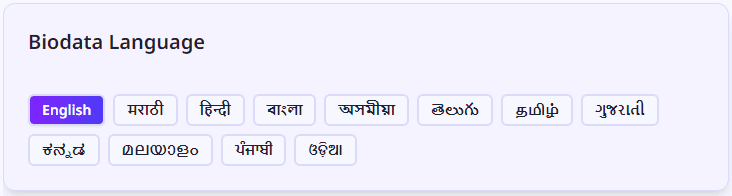
Pick the language that your family is most comfortable reading. Use English for a neutral modern biodata, or use your regional language when the biodata will be shared mainly with parents, elders, and relatives.
Create biodata directly in your language
Choose your language below and open the exact MatriProfile biodata route for that language.
Language-specific biodata routes
Each language has its own MatriProfile route. This is better for users and better for SEO because people can land directly on the language they searched for.
English
Create Marriage Biodata in English
Best for a clean, modern biodata that can be shared across different regions, cities, and families.
Best for
- • Families from different language backgrounds
- • Metro city matches
- • Professional and modern biodata sharing
- • Candidates working in India or abroad
Sample biodata labels
मराठी
Create Marriage Biodata in Marathi
Perfect for Maharashtrian families who prefer reading biodata in Marathi with proper Devanagari support.
Best for
- • Maharashtrian families
- • Marathi-speaking parents and relatives
- • Traditional biodata sharing on WhatsApp
- • Families in Maharashtra and Marathi communities
Sample biodata labels
हिंदी
Create Marriage Biodata in Hindi
Useful for Hindi-speaking families who want biodata details in a familiar and easy-to-read format.
Best for
- • Hindi-speaking families
- • North Indian arranged marriage profiles
- • Parents and elders comfortable with Hindi
- • WhatsApp sharing with relatives
Sample biodata labels
বাংলা
Create Marriage Biodata in Bengali
Create Bengali marriage biodata with proper Bangla text, clean formatting, and readable PDF output.
Best for
- • Bengali-speaking families
- • Families from West Bengal, Assam, Tripura, and Bengali communities
- • Biodata sharing with parents and elders
- • Regional matrimonial introductions
Sample biodata labels
অসমীয়া
Create Marriage Biodata in Assamese
Create Assamese biodata with structured sections and script support for Assamese-speaking families.
Best for
- • Assamese-speaking families
- • Families from Assam
- • Regional biodata sharing
- • Parents and relatives who prefer Assamese
Sample biodata labels
తెలుగు
Create Marriage Biodata in Telugu
Generate Telugu marriage biodata with readable Telugu labels, clean PDF formatting, and proper font support.
Best for
- • Telugu-speaking families
- • Families from Andhra Pradesh and Telangana
- • Parents and elders comfortable with Telugu
- • Regional matrimonial sharing
Sample biodata labels
தமிழ்
Create Marriage Biodata in Tamil
Create Tamil marriage biodata with Tamil labels, family details, partner expectations, and PDF download.
Best for
- • Tamil-speaking families
- • Families from Tamil Nadu
- • Tamil communities in India and abroad
- • Parents who prefer reading matrimonial details in Tamil
Sample biodata labels
ગુજરાતી
Create Marriage Biodata in Gujarati
Create Gujarati biodata with Gujarati labels, proper script rendering, photo, and clean PDF output.
Best for
- • Gujarati-speaking families
- • Families from Gujarat and Mumbai
- • Gujarati communities in India and abroad
- • Traditional family biodata sharing
Sample biodata labels
ಕನ್ನಡ
Create Marriage Biodata in Kannada
Create Kannada marriage biodata with accurate Kannada text display, clean sections, and PDF support.
Best for
- • Kannada-speaking families
- • Families from Karnataka
- • Parents and elders comfortable with Kannada
- • Regional arranged marriage introductions
Sample biodata labels
മലയാളം
Create Marriage Biodata in Malayalam
Generate Malayalam biodata with Malayalam labels, readable formatting, and clean PDF download.
Best for
- • Malayalam-speaking families
- • Families from Kerala
- • Malayali communities in India and abroad
- • Family-first biodata sharing
Sample biodata labels
ਪੰਜਾਬੀ
Create Marriage Biodata in Punjabi
Create Punjabi marriage biodata with proper Gurmukhi script rendering and clean PDF output.
Best for
- • Punjabi-speaking families
- • Families from Punjab
- • Gurmukhi biodata sharing
- • Parents and relatives who prefer Punjabi
Sample biodata labels
ଓଡ଼ିଆ
Create Marriage Biodata in Odia
Create Odia marriage biodata with Odia labels, family details, partner expectations, and PDF download.
Best for
- • Odia-speaking families
- • Families from Odisha
- • Parents and elders comfortable with Odia
- • Regional matrimonial biodata sharing
Sample biodata labels
It switches everything, not just labels
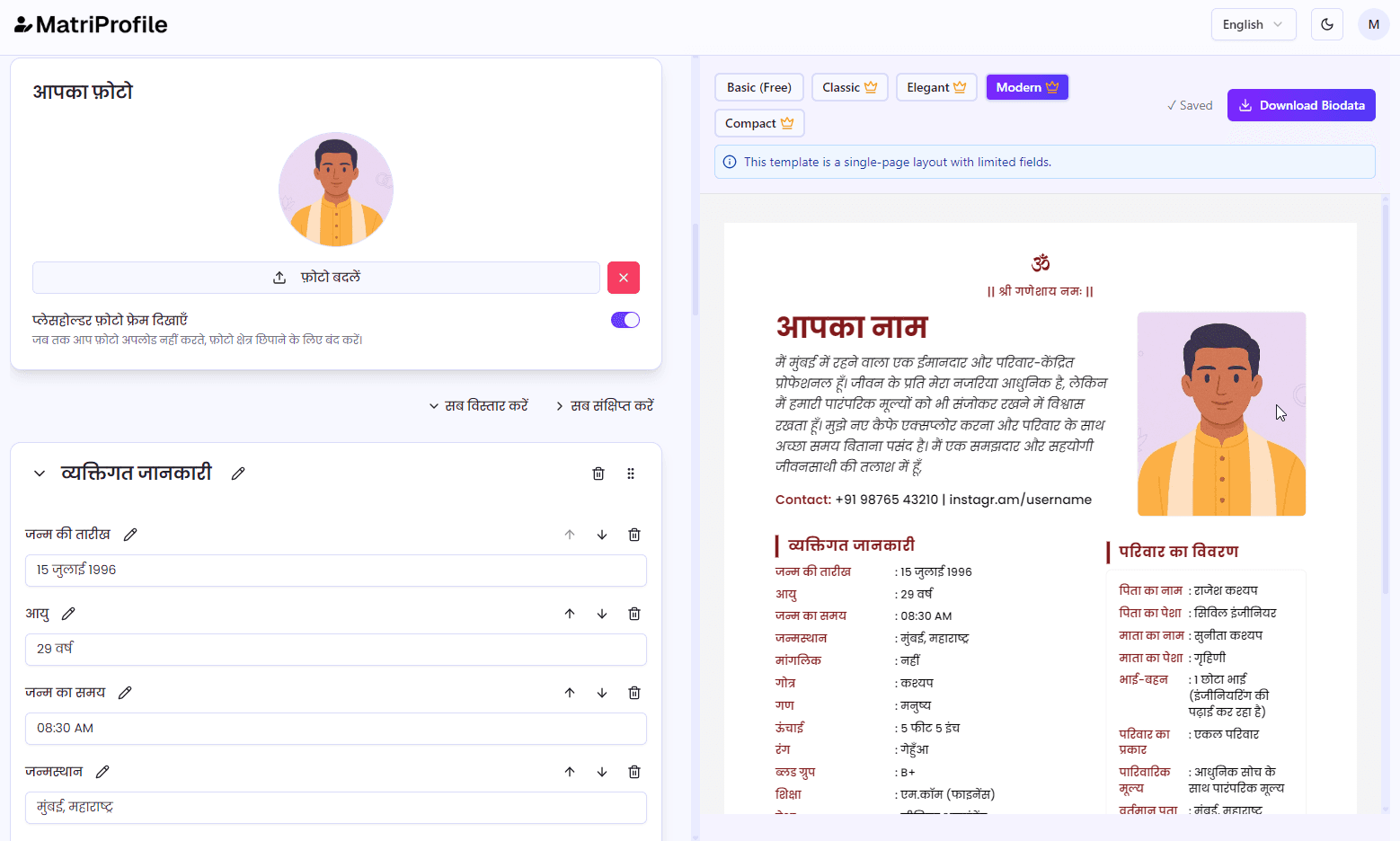
This is not partial translation. When you change the language, the form labels, sections, and UI text update so the biodata feels natural in that language.
It helps families, especially parents and elders, read the biodata without confusion.
Supported fonts for Indian languages
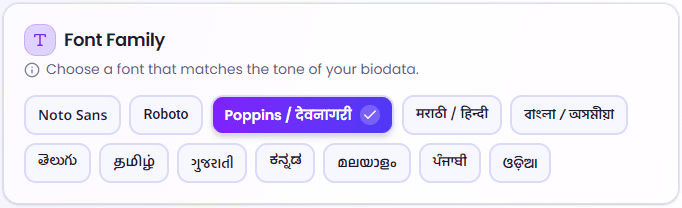
Regional language biodata often breaks at the final PDF step. Letters may look weird, spacing can become messy, or some characters may not render properly.
MatriProfile uses supported fonts for each language so your biodata stays clean and readable when downloaded or printed.
Built for digital sharing and print
Whether your biodata is viewed on mobile, shared on WhatsApp, or printed for a family discussion, the text should remain clear, readable, and properly formatted.
How to type in Indian languages on your device
To create a biodata in Marathi, Hindi, Telugu, Tamil, Gujarati, or any other supported language, you need to enable that language keyboard on your device. Once enabled, you can type directly into MatriProfile.
On phones, Gboard is usually the easiest option because it supports many Indian languages and phonetic typing. On desktop, Windows and Mac both allow adding language keyboards from system settings.
English
How to type English for marriage biodata
Add the English keyboard on your device, then type your biodata details directly in MatriProfile.
Windows
- 1. Open Settings.
- 2. Go to Time & language.
- 3. Open Language & region.
- 4. Add English if it is not already added.
- 5. Open language options and add the keyboard layout.
- 6. Use Windows + Space to switch keyboards while typing.
Mac
- 1. Open System Settings.
- 2. Go to Keyboard.
- 3. Open Text Input and click Edit.
- 4. Add English as an input source if available.
- 5. Use the input menu from the menu bar to switch languages.
Android
- 1. Open Gboard settings.
- 2. Go to Languages.
- 3. Add English.
- 4. Choose the layout you prefer.
- 5. Use the globe key or spacebar swipe to switch keyboards.
iPhone / iPad
- 1. Open Settings.
- 2. Go to General.
- 3. Open Keyboard.
- 4. Tap Keyboards.
- 5. Add English keyboard if available.
- 6. Use the globe key to switch while typing.
Tip: If your device does not show English keyboard directly, install or enable Gboard on mobile, or use a phonetic Indic keyboard on desktop where available. You can also type the text somewhere else and paste it into MatriProfile.
मराठी
How to type Marathi for marriage biodata
Add the Marathi keyboard on your device, then type your biodata details directly in MatriProfile.
Windows
- 1. Open Settings.
- 2. Go to Time & language.
- 3. Open Language & region.
- 4. Add Marathi if it is not already added.
- 5. Open language options and add the keyboard layout.
- 6. Use Windows + Space to switch keyboards while typing.
Mac
- 1. Open System Settings.
- 2. Go to Keyboard.
- 3. Open Text Input and click Edit.
- 4. Add Marathi as an input source if available.
- 5. Use the input menu from the menu bar to switch languages.
Android
- 1. Open Gboard settings.
- 2. Go to Languages.
- 3. Add Marathi.
- 4. Choose the layout you prefer.
- 5. Use the globe key or spacebar swipe to switch keyboards.
iPhone / iPad
- 1. Open Settings.
- 2. Go to General.
- 3. Open Keyboard.
- 4. Tap Keyboards.
- 5. Add Marathi keyboard if available.
- 6. Use the globe key to switch while typing.
Tip: If your device does not show Marathi keyboard directly, install or enable Gboard on mobile, or use a phonetic Indic keyboard on desktop where available. You can also type the text somewhere else and paste it into MatriProfile.
हिंदी
How to type Hindi for marriage biodata
Add the Hindi keyboard on your device, then type your biodata details directly in MatriProfile.
Windows
- 1. Open Settings.
- 2. Go to Time & language.
- 3. Open Language & region.
- 4. Add Hindi if it is not already added.
- 5. Open language options and add the keyboard layout.
- 6. Use Windows + Space to switch keyboards while typing.
Mac
- 1. Open System Settings.
- 2. Go to Keyboard.
- 3. Open Text Input and click Edit.
- 4. Add Hindi as an input source if available.
- 5. Use the input menu from the menu bar to switch languages.
Android
- 1. Open Gboard settings.
- 2. Go to Languages.
- 3. Add Hindi.
- 4. Choose the layout you prefer.
- 5. Use the globe key or spacebar swipe to switch keyboards.
iPhone / iPad
- 1. Open Settings.
- 2. Go to General.
- 3. Open Keyboard.
- 4. Tap Keyboards.
- 5. Add Hindi keyboard if available.
- 6. Use the globe key to switch while typing.
Tip: If your device does not show Hindi keyboard directly, install or enable Gboard on mobile, or use a phonetic Indic keyboard on desktop where available. You can also type the text somewhere else and paste it into MatriProfile.
বাংলা
How to type Bengali for marriage biodata
Add the Bengali keyboard on your device, then type your biodata details directly in MatriProfile.
Windows
- 1. Open Settings.
- 2. Go to Time & language.
- 3. Open Language & region.
- 4. Add Bengali if it is not already added.
- 5. Open language options and add the keyboard layout.
- 6. Use Windows + Space to switch keyboards while typing.
Mac
- 1. Open System Settings.
- 2. Go to Keyboard.
- 3. Open Text Input and click Edit.
- 4. Add Bengali as an input source if available.
- 5. Use the input menu from the menu bar to switch languages.
Android
- 1. Open Gboard settings.
- 2. Go to Languages.
- 3. Add Bengali.
- 4. Choose the layout you prefer.
- 5. Use the globe key or spacebar swipe to switch keyboards.
iPhone / iPad
- 1. Open Settings.
- 2. Go to General.
- 3. Open Keyboard.
- 4. Tap Keyboards.
- 5. Add Bengali keyboard if available.
- 6. Use the globe key to switch while typing.
Tip: If your device does not show Bengali keyboard directly, install or enable Gboard on mobile, or use a phonetic Indic keyboard on desktop where available. You can also type the text somewhere else and paste it into MatriProfile.
অসমীয়া
How to type Assamese for marriage biodata
Add the Assamese keyboard on your device, then type your biodata details directly in MatriProfile.
Windows
- 1. Open Settings.
- 2. Go to Time & language.
- 3. Open Language & region.
- 4. Add Assamese if it is not already added.
- 5. Open language options and add the keyboard layout.
- 6. Use Windows + Space to switch keyboards while typing.
Mac
- 1. Open System Settings.
- 2. Go to Keyboard.
- 3. Open Text Input and click Edit.
- 4. Add Assamese as an input source if available.
- 5. Use the input menu from the menu bar to switch languages.
Android
- 1. Open Gboard settings.
- 2. Go to Languages.
- 3. Add Assamese.
- 4. Choose the layout you prefer.
- 5. Use the globe key or spacebar swipe to switch keyboards.
iPhone / iPad
- 1. Open Settings.
- 2. Go to General.
- 3. Open Keyboard.
- 4. Tap Keyboards.
- 5. Add Assamese keyboard if available.
- 6. Use the globe key to switch while typing.
Tip: If your device does not show Assamese keyboard directly, install or enable Gboard on mobile, or use a phonetic Indic keyboard on desktop where available. You can also type the text somewhere else and paste it into MatriProfile.
తెలుగు
How to type Telugu for marriage biodata
Add the Telugu keyboard on your device, then type your biodata details directly in MatriProfile.
Windows
- 1. Open Settings.
- 2. Go to Time & language.
- 3. Open Language & region.
- 4. Add Telugu if it is not already added.
- 5. Open language options and add the keyboard layout.
- 6. Use Windows + Space to switch keyboards while typing.
Mac
- 1. Open System Settings.
- 2. Go to Keyboard.
- 3. Open Text Input and click Edit.
- 4. Add Telugu as an input source if available.
- 5. Use the input menu from the menu bar to switch languages.
Android
- 1. Open Gboard settings.
- 2. Go to Languages.
- 3. Add Telugu.
- 4. Choose the layout you prefer.
- 5. Use the globe key or spacebar swipe to switch keyboards.
iPhone / iPad
- 1. Open Settings.
- 2. Go to General.
- 3. Open Keyboard.
- 4. Tap Keyboards.
- 5. Add Telugu keyboard if available.
- 6. Use the globe key to switch while typing.
Tip: If your device does not show Telugu keyboard directly, install or enable Gboard on mobile, or use a phonetic Indic keyboard on desktop where available. You can also type the text somewhere else and paste it into MatriProfile.
தமிழ்
How to type Tamil for marriage biodata
Add the Tamil keyboard on your device, then type your biodata details directly in MatriProfile.
Windows
- 1. Open Settings.
- 2. Go to Time & language.
- 3. Open Language & region.
- 4. Add Tamil if it is not already added.
- 5. Open language options and add the keyboard layout.
- 6. Use Windows + Space to switch keyboards while typing.
Mac
- 1. Open System Settings.
- 2. Go to Keyboard.
- 3. Open Text Input and click Edit.
- 4. Add Tamil as an input source if available.
- 5. Use the input menu from the menu bar to switch languages.
Android
- 1. Open Gboard settings.
- 2. Go to Languages.
- 3. Add Tamil.
- 4. Choose the layout you prefer.
- 5. Use the globe key or spacebar swipe to switch keyboards.
iPhone / iPad
- 1. Open Settings.
- 2. Go to General.
- 3. Open Keyboard.
- 4. Tap Keyboards.
- 5. Add Tamil keyboard if available.
- 6. Use the globe key to switch while typing.
Tip: If your device does not show Tamil keyboard directly, install or enable Gboard on mobile, or use a phonetic Indic keyboard on desktop where available. You can also type the text somewhere else and paste it into MatriProfile.
ગુજરાતી
How to type Gujarati for marriage biodata
Add the Gujarati keyboard on your device, then type your biodata details directly in MatriProfile.
Windows
- 1. Open Settings.
- 2. Go to Time & language.
- 3. Open Language & region.
- 4. Add Gujarati if it is not already added.
- 5. Open language options and add the keyboard layout.
- 6. Use Windows + Space to switch keyboards while typing.
Mac
- 1. Open System Settings.
- 2. Go to Keyboard.
- 3. Open Text Input and click Edit.
- 4. Add Gujarati as an input source if available.
- 5. Use the input menu from the menu bar to switch languages.
Android
- 1. Open Gboard settings.
- 2. Go to Languages.
- 3. Add Gujarati.
- 4. Choose the layout you prefer.
- 5. Use the globe key or spacebar swipe to switch keyboards.
iPhone / iPad
- 1. Open Settings.
- 2. Go to General.
- 3. Open Keyboard.
- 4. Tap Keyboards.
- 5. Add Gujarati keyboard if available.
- 6. Use the globe key to switch while typing.
Tip: If your device does not show Gujarati keyboard directly, install or enable Gboard on mobile, or use a phonetic Indic keyboard on desktop where available. You can also type the text somewhere else and paste it into MatriProfile.
ಕನ್ನಡ
How to type Kannada for marriage biodata
Add the Kannada keyboard on your device, then type your biodata details directly in MatriProfile.
Windows
- 1. Open Settings.
- 2. Go to Time & language.
- 3. Open Language & region.
- 4. Add Kannada if it is not already added.
- 5. Open language options and add the keyboard layout.
- 6. Use Windows + Space to switch keyboards while typing.
Mac
- 1. Open System Settings.
- 2. Go to Keyboard.
- 3. Open Text Input and click Edit.
- 4. Add Kannada as an input source if available.
- 5. Use the input menu from the menu bar to switch languages.
Android
- 1. Open Gboard settings.
- 2. Go to Languages.
- 3. Add Kannada.
- 4. Choose the layout you prefer.
- 5. Use the globe key or spacebar swipe to switch keyboards.
iPhone / iPad
- 1. Open Settings.
- 2. Go to General.
- 3. Open Keyboard.
- 4. Tap Keyboards.
- 5. Add Kannada keyboard if available.
- 6. Use the globe key to switch while typing.
Tip: If your device does not show Kannada keyboard directly, install or enable Gboard on mobile, or use a phonetic Indic keyboard on desktop where available. You can also type the text somewhere else and paste it into MatriProfile.
മലയാളം
How to type Malayalam for marriage biodata
Add the Malayalam keyboard on your device, then type your biodata details directly in MatriProfile.
Windows
- 1. Open Settings.
- 2. Go to Time & language.
- 3. Open Language & region.
- 4. Add Malayalam if it is not already added.
- 5. Open language options and add the keyboard layout.
- 6. Use Windows + Space to switch keyboards while typing.
Mac
- 1. Open System Settings.
- 2. Go to Keyboard.
- 3. Open Text Input and click Edit.
- 4. Add Malayalam as an input source if available.
- 5. Use the input menu from the menu bar to switch languages.
Android
- 1. Open Gboard settings.
- 2. Go to Languages.
- 3. Add Malayalam.
- 4. Choose the layout you prefer.
- 5. Use the globe key or spacebar swipe to switch keyboards.
iPhone / iPad
- 1. Open Settings.
- 2. Go to General.
- 3. Open Keyboard.
- 4. Tap Keyboards.
- 5. Add Malayalam keyboard if available.
- 6. Use the globe key to switch while typing.
Tip: If your device does not show Malayalam keyboard directly, install or enable Gboard on mobile, or use a phonetic Indic keyboard on desktop where available. You can also type the text somewhere else and paste it into MatriProfile.
ਪੰਜਾਬੀ
How to type Punjabi for marriage biodata
Add the Punjabi keyboard on your device, then type your biodata details directly in MatriProfile.
Windows
- 1. Open Settings.
- 2. Go to Time & language.
- 3. Open Language & region.
- 4. Add Punjabi if it is not already added.
- 5. Open language options and add the keyboard layout.
- 6. Use Windows + Space to switch keyboards while typing.
Mac
- 1. Open System Settings.
- 2. Go to Keyboard.
- 3. Open Text Input and click Edit.
- 4. Add Punjabi as an input source if available.
- 5. Use the input menu from the menu bar to switch languages.
Android
- 1. Open Gboard settings.
- 2. Go to Languages.
- 3. Add Punjabi.
- 4. Choose the layout you prefer.
- 5. Use the globe key or spacebar swipe to switch keyboards.
iPhone / iPad
- 1. Open Settings.
- 2. Go to General.
- 3. Open Keyboard.
- 4. Tap Keyboards.
- 5. Add Punjabi keyboard if available.
- 6. Use the globe key to switch while typing.
Tip: If your device does not show Punjabi keyboard directly, install or enable Gboard on mobile, or use a phonetic Indic keyboard on desktop where available. You can also type the text somewhere else and paste it into MatriProfile.
ଓଡ଼ିଆ
How to type Odia for marriage biodata
Add the Odia keyboard on your device, then type your biodata details directly in MatriProfile.
Windows
- 1. Open Settings.
- 2. Go to Time & language.
- 3. Open Language & region.
- 4. Add Odia if it is not already added.
- 5. Open language options and add the keyboard layout.
- 6. Use Windows + Space to switch keyboards while typing.
Mac
- 1. Open System Settings.
- 2. Go to Keyboard.
- 3. Open Text Input and click Edit.
- 4. Add Odia as an input source if available.
- 5. Use the input menu from the menu bar to switch languages.
Android
- 1. Open Gboard settings.
- 2. Go to Languages.
- 3. Add Odia.
- 4. Choose the layout you prefer.
- 5. Use the globe key or spacebar swipe to switch keyboards.
iPhone / iPad
- 1. Open Settings.
- 2. Go to General.
- 3. Open Keyboard.
- 4. Tap Keyboards.
- 5. Add Odia keyboard if available.
- 6. Use the globe key to switch while typing.
Tip: If your device does not show Odia keyboard directly, install or enable Gboard on mobile, or use a phonetic Indic keyboard on desktop where available. You can also type the text somewhere else and paste it into MatriProfile.
Why language-specific biodata feels better
A biodata is often the first thing a family sees. When it is written in the language they are comfortable with, communication becomes smoother from the start.
English is good for a modern and widely readable biodata. But regional language biodata feels more personal when parents, elders, and relatives are involved in the conversation.
Your marriage biodata should feel natural in your language, not forced in someone else’s.
Try it now
Choose your preferred language, fill your details, preview your biodata, and download a clean PDF.
Create biodata in your preferred language
Switch languages instantly and generate a clean, readable marriage biodata that families can understand at first glance.
Want more? Read all blog posts.